Problem
Manual screenshots never look right
Stitching multiple screenshots is slow, inconsistent, and often misses sections—especially on long-scrolling pages and dashboards.
 Web Converter
Use Web Converter to capture live websites as PDFs or images directly in Chrome—no unstable web converter to PDF sites, no watermarks, and no copy-paste gymnastics.
You just want a clean PDF or image of a web page—but browser print dialogs and random website converter sites make it painful.
Stitching multiple screenshots is slow, inconsistent, and often misses sections—especially on long-scrolling pages and dashboards.
Many web converter to PDF tools require pasting links, uploading content, and waiting in queues— with size limits, compression, and privacy concerns.
Web Converter lives in your browser. It captures full pages, preserves layout and styles, and exports directly to PDF or JPG in seconds—no external services needed.
Designed for people who regularly need reliable web-to-document exports without babysitting the process.
Capture landing pages, funnels, and client sites as clean PDFs or images for audits, proposals, and before/after portfolios.
Export live dashboards, campaign results, and web reports for stakeholders—no more blurry screenshots in slide decks.
Save UI states, style guides, and layouts as reference PDFs or JPGs when handing off to clients and collaborators.
Everything you need to reliably export websites—whether you prefer PDF for documents or JPG for visuals.
Click the Web Converter icon to capture an entire page, including content below the fold, without manual scrolling.
Choose between document-friendly PDFs or shareable JPG images for social posts, reports, or client previews.
Web Converter keeps fonts, colors, and spacing as close as possible to the real site, avoiding distorted exports.
Control PDF page size (A4, Letter, custom) and orientation so reports and exports print neatly.
Configure resolution for JPG exports to get crisp visuals for slides, design reviews, and portfolios.
Unlike many website converter tools, Web Converter processes captures in your browser—no uploads to third-party servers.
Automatically name files using page titles or custom patterns so you can quickly find exports later.
Capture dashboards, admin tools, and intranet pages—if Chrome can see it, Web Converter can usually export it.
Pay once and use Web Converter forever on one Chrome profile. Get ongoing improvements without extra fees.
Focused on reliability, privacy, and quality output.
From live page to export-ready file in under a minute.
Preview the workflow before you add it to your browser.
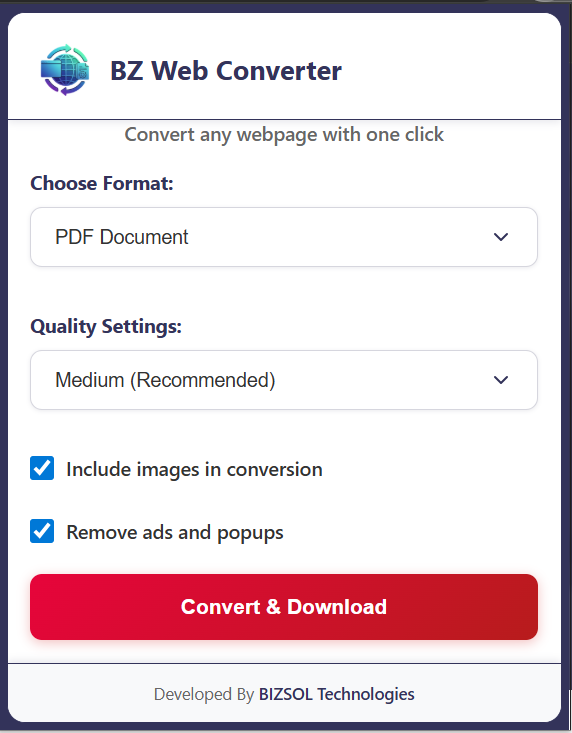
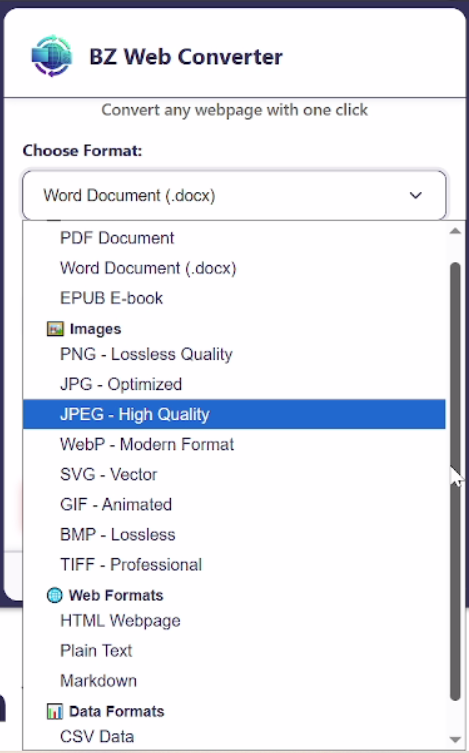
Ways you can turn everyday browsing into reusable assets.
Capture full websites as PDFs for audits, benchmarks, and before/after redesign comparisons—no manual stitching.
Turn analytics dashboards and live tools into shareable PDFs or JPGs for leadership reviews and investor updates.
Save UI flows and page states as images for design critiques, portfolio uploads, and research archives.
Simple, predictable pricing for an everyday tool.
Ideal for solo founders, freelancers, and individual team members who regularly need website exports.
Try Web Converter for 14 days. If it doesn’t become your go-to way to export websites, email us and we’ll refund your purchase.
For refunds, team pricing, or bulk licensing, contact support@bizsoltech.com.
Local-first web capture with responsive human help.
Web Converter processes pages in your browser, avoiding the need to paste URLs into third-party web converter to pdf or image services. Your sensitive dashboards and intranet pages stay in your environment.
Need help or have a feature request? Reach us at support@bizsoltech.com. Detailed docs and tips live at bizsoltech.com/plugins/web-converter/docs.
Typical response time: within 1–2 business days.
Answers to common questions about buying, installing, and using Web Converter.
No. Web Converter is a one-time purchase of $29 for a single seat, with lifetime updates included.
Yes. You can configure Web Converter to capture the entire scrollable page or just the visible viewport, depending on your use case.
No. Web Converter only acts when you click the extension icon. It does not inject heavy scripts or track normal browsing activity.
Your license is tied to a single Chrome profile. You can move it between devices by signing into the same profile. For multi-seat usage, contact us for team options.
It scrolls and stitches content in the background. Most sites work smoothly, but extremely long or heavy pages may require adjusting settings like scale or resolution.
Yes. Your PDFs and JPGs are completely watermark-free, suitable for both internal use and client-facing deliverables.
Start by checking our troubleshooting section in the docs. If you still see issues, contact support and share a sample page—we’ll work with you, and you’re covered by the 14-day guarantee.
Within 14 days of purchase, email support@bizsoltech.com with your order details. If Web Converter isn’t the right fit, we’ll process a refund.
We publish changelogs on the docs page and in the main plugin listing at bizsoltech.com/plugins.
Add Web Converter to Chrome and capture full web pages as PDFs or JPGs in a single click—no more clumsy screenshots or unreliable online tools.